ChatGPT Business Hub: What It Measures, What It Misses, and What to Do First
OpenAI's ChatGPT Business Hub lets brands claim a profile and see mentions, clicks and discovery topics. What the metrics mean, their limits and setup steps.
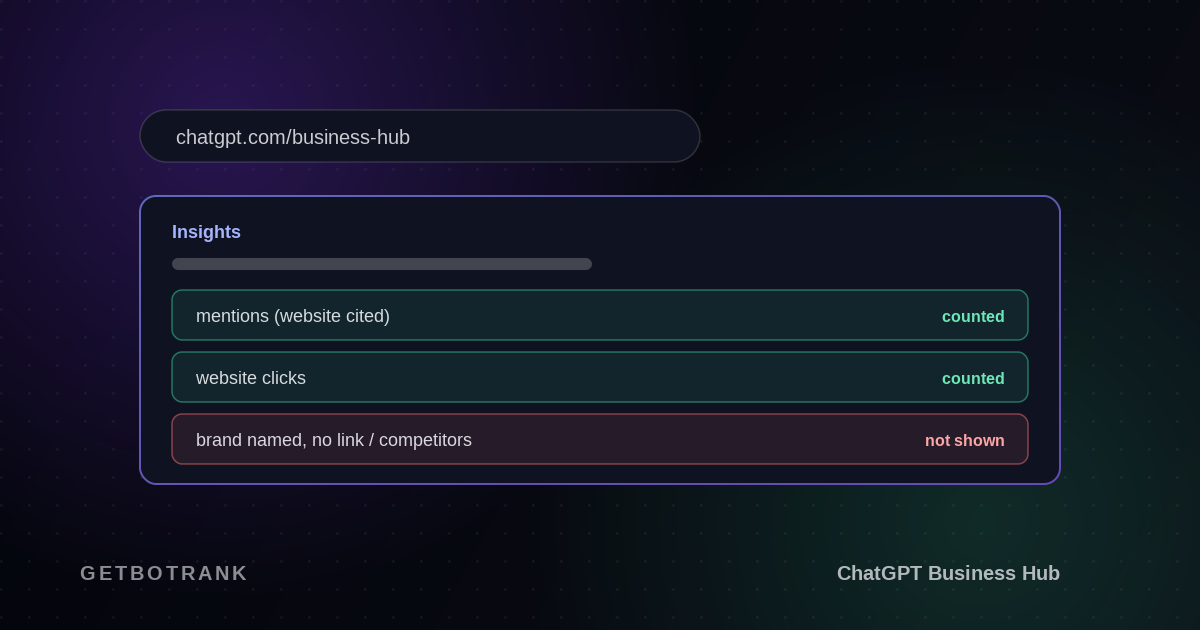
ChatGPT Business Hub is OpenAI's new, free beta dashboard where a business can claim its ChatGPT profile, manage its details, and see how often ChatGPT references its website, how many clicks those references get, and which topics they come up in. It is the first first-party AI search data most brands have ever had, and you should claim yours this week. But it only counts mentions that reference your website, covers only ChatGPT, and shows no competitors, so it answers "how am I doing in ChatGPT" only partly.
What OpenAI launched
On November 10, 2026, OpenAI announced Businesses in ChatGPT in beta. Search Engine Roundtable quotes OpenAI's post: businesses can claim their business, manage their information and see insights on how people engage with them, through Business Hub at chatgpt.com/business-hub. OpenAI framed it around reaching the 1.2 billion people it says use ChatGPT each week.
There are two parts:
- Business Hub, the claim-and-insights dashboard. Per Search Engine Journal, any eligible business located where ChatGPT is available can claim.
- Business Agents, a chat experience inside ChatGPT where users can ask a business follow-up questions about its offerings. This part starts only with eligible ecommerce and online service businesses in the US, and according to Relevant Audience's summary of the launch coverage, the same agent can be sponsored as a ChatGPT Ads destination.
Both are free for now. OpenAI has not ruled out paid options later, per the same Relevant Audience write-up citing Digiday.
What the dashboard actually measures
Once a claim is approved, Insights show three core metrics. The definitions matter more than the numbers, so here they are as reported from OpenAI's setup guide and spokesperson comments:
- Mentions. For an online business, a mention counts when ChatGPT references your website. For a local business, it counts when ChatGPT shows a result for your location. Your brand name alone, with no website reference, does not count (Ryan Doser's walkthrough of the help docs, Relevant Audience).
- Website clicks. Recorded clicks on links to your site inside ChatGPT. The dashboard's own tooltip says clicks do not confirm visits or conversions, per Search Engine Roundtable's screenshot.
- Discovery topics. Common themes across conversations where your website is cited. You see themes, not the actual prompts or conversations.
Insights are aggregated, appear only above certain volume thresholds, and a blank tile can mean you are under the threshold or data is still collecting rather than zero activity. Ryan Doser reports that OpenAI's guide covers the past 28 days, while Relevant Audience notes OpenAI declined to tell Digiday how long mentions are tracked, so treat the window as something to confirm in your own dashboard.
For scale, SEJ's director of technology shared Search Engine Journal's own numbers: 353,356 mentions and 2,663 website clicks from October 14 to November 10. That is one publisher, not a benchmark, but it shows how far apart the two numbers can be.
What it misses
Business Hub is useful, and it also has clear blind spots. Knowing them keeps you from drawing the wrong conclusions.
Unlinked recommendations are invisible. A lot of brand visibility in AI answers is a name in a list: "the best options are X, Y and Z." If ChatGPT names you without referencing your site, Business Hub does not count it. A brand that is often recommended but rarely cited can look weak in the dashboard while doing fine with buyers.
There is no competitor view. You see your own mentions only. Relevant Audience reports that share of voice is not part of the beta, so you cannot tell whether a competitor is named twice as often for the same questions.
It covers one engine. Your buyers also use Gemini, Claude, Perplexity and Google's AI Mode. Business Hub tells you nothing about those.
It shows themes, not questions. Discovery topics hint at where you show up, but you cannot see which specific buyer questions you win or lose, or what ChatGPT says about you in them.
Clicks will not match your analytics. Recorded clicks are not sessions, and some ChatGPT traffic arrives without a referrer anyway. We covered that second problem in Your AI Referral Traffic Is Hiding in 'Direct'.
Claiming is not a ranking lever. OpenAI's Benji Shomair told Digiday that claiming should not change how often a business appears, per Relevant Audience. Clearer information may help ChatGPT match you to more relevant conversations, but the dashboard reports visibility, it does not create it.
How to claim your business
The steps below follow Ryan Doser's summary of OpenAI's help docs and Search Engine Roundtable's hands-on test:
- Open Business Hub from the ChatGPT sidebar or go to chatgpt.com/business-hub. No ads account or Enterprise plan is needed.
- Search for your business and select the listing. Eligible online businesses may be able to add a missing listing; local businesses can claim only an existing US listing.
- Verify ownership by phone or text to your main business number, business email, a DNS TXT record on your domain, or a connected Shopify store.
- Complete identity verification. Doser reports OpenAI uses Persona, which may ask for ID, business registration details and proof that you represent the business. Insights and edits stay locked until approval.
- Once approved, review your website, description, category, logo and policies, and add a product feed if you sell products.
Barry Schwartz at Search Engine Roundtable wrote that he worries about people hijacking business profiles. That is a good reason to claim early: if someone else has claimed yours, Doser describes a dispute ownership option that goes through the same identity checks.
What to do this week
- Claim and verify. Even if you are outside the US, try the claim rather than assuming you are not eligible. OpenAI has not published a country list.
- Fix your profile facts. Make the description, category and policies match your site exactly. Inconsistent facts across sources are how AI answers end up wrong.
- Record a baseline. Screenshot your mentions, clicks and discovery topics now, and note your ChatGPT referral sessions in analytics for the same window. Compare trends monthly, not absolute numbers.
- Read discovery topics as a content brief. Topics where you are cited show what is working. Topics you expected but do not see point to pages that need clearer, more quotable answers. Our guide on structuring content so LLMs cite it covers the format.
- Make sure ChatGPT can reach your pages. Mentions here depend on ChatGPT referencing your website, which is harder if OAI-SearchBot or ChatGPT-User is blocked. Check with the free AI crawler access tool.
- Fill the gaps with your own tracking. Run the buyer questions that matter to you across several engines and track whether you are named, linked or not, and who is named instead.
Where GetBotRank fits
Business Hub is a welcome step: real first-party data from the engine itself. It pairs well with the questions it cannot answer. GetBotRank's Visibility Tracker runs your chosen buyer-intent questions across ChatGPT, Claude and Gemini on a schedule and records whether your brand is mentioned at all, linked or not, alongside competitors. The page audits then help you diagnose and fix what keeps a page from being cited, and you can verify the result in both tools. If you want a quick starting point, the free AI visibility audit checks AI crawler access on your key pages with no signup.
The bottom line
For the first time, OpenAI is telling businesses how often ChatGPT points users to their website. Claim your profile, clean up its facts and start a baseline. Just remember what the dashboard counts: website references in one engine, with no view of competitors or the exact questions buyers ask. Use it as one signal among several, not as the scoreboard.
Frequently asked questions
What is ChatGPT Business Hub?
ChatGPT Business Hub is a free beta tool OpenAI launched on November 10, 2026 as part of Businesses in ChatGPT. A business can claim its profile at chatgpt.com/business-hub, verify ownership, manage details like its description and website, and see insights on mentions, website clicks and discovery topics in ChatGPT.
Does ChatGPT Business Hub count every time ChatGPT names my brand?
No. According to OpenAI's definitions as reported by several outlets, an online business gets a mention when ChatGPT references its website, and a local business when ChatGPT shows a result for its location. A brand name that appears in an answer without a website reference is not counted, so unlinked brand recommendations are invisible in the dashboard.
Will claiming my business in ChatGPT improve my visibility?
OpenAI has said claiming does not guarantee more visibility or higher placement. An OpenAI executive told Digiday it should not change how often a business appears, though clearer information may help ChatGPT surface a business in more relevant conversations. Treat the claim as a way to correct facts and get data, not as a ranking lever.
Do ChatGPT Business Hub clicks match my analytics?
Not exactly. A recorded click is a click on a link to your site inside ChatGPT, not a confirmed visit or conversion, and low-volume counts can be withheld for privacy. Compare the click trend with ChatGPT referral sessions in your own analytics over the same window rather than expecting the numbers to line up.