AI Crawler Log Analysis: How to See Which AI Bots Visit Your Site
A practical guide to AI crawler log analysis: find GPTBot, ClaudeBot and PerplexityBot in your server logs, verify real bots by IP, and find pages AI skips.
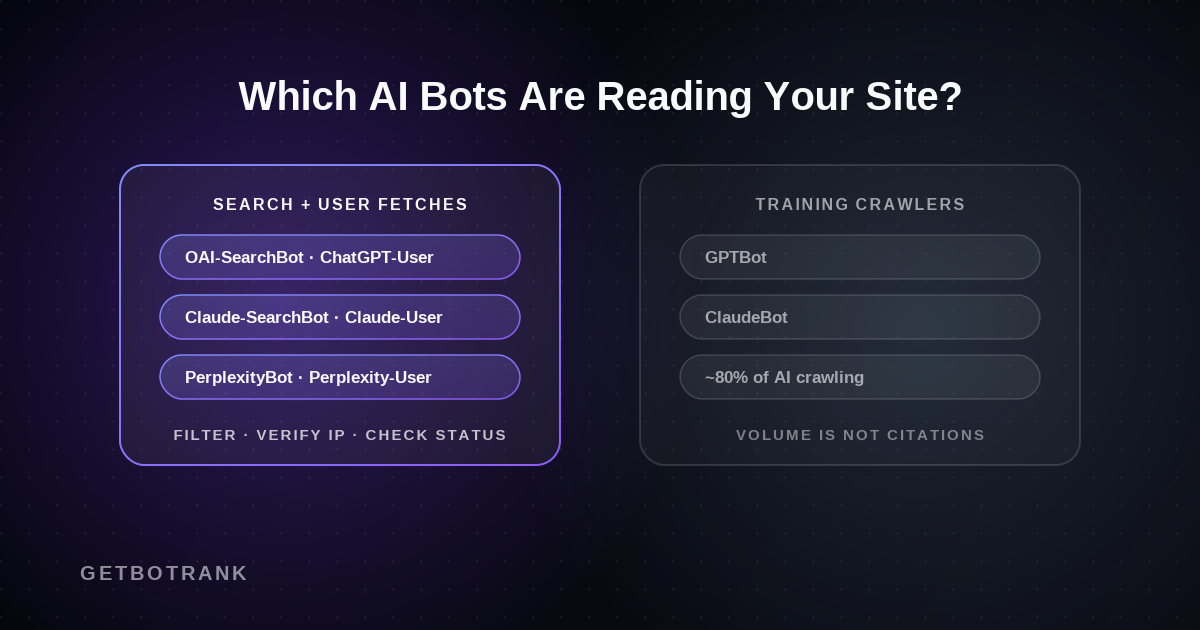
AI crawler log analysis means filtering your server access logs for the user agents that AI companies publish (GPTBot, ClaudeBot, PerplexityBot and their siblings), verifying those hits against the vendors' official IP lists, and checking which pages each bot actually received with a 200 response. It is the only first-party evidence you have that ChatGPT, Claude or Perplexity can read your site at all, and it often reveals blocked or ignored pages that robots.txt checks miss.
Visibility trackers tell you whether AI answers mention you. Logs tell you why they might not: if a bot never fetched your pricing page, no prompt tweak will get it cited. Here is how to run the analysis without a data team.
Know which bot is which before you start
Most AI companies now run several crawlers with different jobs, and mixing them up leads to bad decisions. The split that matters is training versus search versus user-triggered fetches.
OpenAI lists four agents in its crawler documentation:
- GPTBot collects content that may be used to train OpenAI's foundation models.
- OAI-SearchBot finds pages to surface in ChatGPT search.
- ChatGPT-User fetches a page when a person asks ChatGPT or a custom GPT to do something. OpenAI notes robots.txt may not apply here because the request is user-initiated.
- OAI-AdsBot visits landing pages submitted for ChatGPT ads to check policy compliance.
Anthropic describes three in its help center article on crawling: ClaudeBot gathers content that may contribute to training, Claude-SearchBot indexes pages to improve search answers, and Claude-User visits sites when a person asks Claude a question. Anthropic says its bots honor robots.txt and even the non-standard Crawl-delay directive.
Perplexity documents two in its crawler reference: PerplexityBot, which surfaces and links pages in Perplexity search and is not used for model training, and Perplexity-User, which fetches pages to answer a specific user question. Perplexity says the user agent generally ignores robots.txt, since a person requested the fetch.
One more: Google-Extended controls whether Google can use your content for Gemini training, but it is a robots.txt token only. It never shows up in logs, because Google's crawling is still done by Googlebot.
For brand visibility, the search and user-triggered agents are the ones to watch. A training crawler hit means your content may shape a future model. A ChatGPT-User or Claude-User hit means someone's live conversation just pulled your page.
Step 1: Get the right logs
You need raw access logs with at least the timestamp, requested URL, status code, user agent and client IP. Where they live depends on your stack:
- Self-hosted Nginx or Apache: the standard access log on the server, often rotated daily.
- CDN in front of your site: your CDN's request logs, which are more complete because bots blocked at the edge never reach your origin server. Many CDNs only export these on paid plans.
- Managed hosts and serverless platforms: check the platform's log drain or export option. Some keep only a few days, so set up a drain before you need it.
Pull at least two to four weeks. Search and training crawlers revisit on irregular schedules, and a single day can make a healthy site look ignored.
Step 2: Filter for AI user agents
A plain text search gets you most of the way. On a standard combined log format file, this pulls every AI crawler hit:
grep -Ei "GPTBot|OAI-SearchBot|ChatGPT-User|OAI-AdsBot|ClaudeBot|Claude-SearchBot|Claude-User|PerplexityBot|Perplexity-User" access.log > ai-hits.log
Then count hits per bot to see who is actually showing up:
grep -Eoi "GPTBot|OAI-SearchBot|ChatGPT-User|ClaudeBot|Claude-SearchBot|Claude-User|PerplexityBot|Perplexity-User" ai-hits.log | sort | uniq -c | sort -rn
If your logs are in a CDN dashboard or a log tool instead, the same idea applies: filter the user agent field for those tokens and group by agent.
Step 3: Verify that the bots are real
User agent strings are trivial to fake, and scrapers routinely borrow the names of well-known crawlers. Before you trust a number, check the source IPs against the lists each vendor publishes:
- OpenAI publishes separate files for GPTBot, OAI-SearchBot and ChatGPT-User, all linked from its crawler docs.
- Perplexity publishes PerplexityBot and Perplexity-User ranges.
- Anthropic points to a single bots.json list and says traffic from those IPs is coming from Anthropic, while recommending robots.txt rather than IP blocking as the way to opt out.
A short script that loads these files and tags each log line as verified or unverified is enough. Treat unverified "GPTBot" traffic as an ordinary scraper, not as evidence that OpenAI is reading your site.
Step 4: Read the results for what they mean
Once you have verified hits, group them by URL and status code. Four patterns cover most of what you will find.
- Bots get 403, 429 or challenge pages. Something is refusing them. If robots.txt allows the bot, the block sits in a CDN, firewall or hosting rule. We wrote about how often that happens without anyone deciding it in most AI crawler blocks were never a decision.
- Bots fetch the homepage and blog but skip money pages. Product, pricing and comparison pages that nobody links to internally, or that are missing from your sitemap, often go unvisited. Those are exactly the pages buyers ask AI about.
- Bots get a 200, but the page is an empty shell. A successful response does not mean the content arrived. Many AI fetchers do not run JavaScript, so a client-rendered page can be read as a blank template. Check what the raw HTML contains with our free crawler view tool.
- Only training crawlers show up. Heavy GPTBot or ClaudeBot traffic with almost no search or user-triggered hits is common. Cloudflare's crawl-to-click analysis found that training accounted for nearly 80% of AI crawling by mid-2025, so raw crawl volume says little about whether you are being cited.
The user-triggered agents are the closest thing logs offer to a citation signal. A rising number of ChatGPT-User, Claude-User or Perplexity-User hits on a page suggests it is being pulled into live answers. It is still indirect: a fetch is not a mention, and an answer can name you without fetching anything.
What to do with what you find
Turn the analysis into a short fix list rather than a report:
- Unblock the bots you want. Decide training access as a policy question, but make sure search and user-triggered agents are not blocked by accident. The free crawler access checker compares a bot request against a normal browser request on any URL, so you can confirm the fix worked from the outside.
- Link to the pages bots skip. Add internal links from frequently crawled pages to pricing, product and comparison pages, and confirm they are in your XML sitemap.
- Server-render the content that matters. If key facts only appear after JavaScript runs, move them into the initial HTML.
- Re-check after every infrastructure change. CDN migrations, new bot protection rules and redesigns are the usual moments a block appears.
- Pair logs with answer tracking. Logs show access, not outcomes. To see whether better access turns into mentions, track the buyer questions that matter, as covered in our guide to picking AI visibility prompts.
Where GetBotRank fits
Log analysis is worth doing by hand at least once, because it shows you how AI systems actually treat your site. Keeping it up every week is harder. GetBotRank's Page Monitor and audits re-check your key pages for crawler access, rendering and structure, and the Visibility Tracker runs your buyer questions across ChatGPT, Claude and Gemini on a schedule, so you can see whether a fix moved your mention rate. If you want a quick starting point, the free AI visibility audit checks one page with no signup.
Frequently asked questions
How do I see which AI bots are crawling my site?
Open your web server or CDN access logs and filter the user agent field for the published AI crawler tokens, such as GPTBot, OAI-SearchBot, ChatGPT-User, ClaudeBot, Claude-SearchBot, Claude-User, PerplexityBot and Perplexity-User. Then group the hits by URL and status code to see which pages each bot reads and whether it gets a 200 response.
Can AI crawler user agents be faked?
Yes. Anyone can send a request that claims to be GPTBot or ClaudeBot. To confirm a hit is genuine, compare the source IP with the ranges the vendor publishes: OpenAI, Perplexity and Anthropic each publish JSON files listing the IP addresses their bots use.
What is the difference between GPTBot and ChatGPT-User in my logs?
According to OpenAI's crawler documentation, GPTBot collects content that may be used to train its models, OAI-SearchBot gathers pages for ChatGPT search results, and ChatGPT-User fetches a page because a person asked ChatGPT to do something. A ChatGPT-User hit usually means your page was pulled into a live conversation.
What should I do if AI bots get 403 errors on my site?
First check robots.txt for a Disallow rule covering that bot. If robots.txt allows it, the block is coming from a CDN, firewall or hosting rule. Run the URL through a crawler access checker to compare a bot request with a normal browser request, then adjust the rule for the search and user-triggered bots you want to reach your pages.